
Contents
What are PageSpeed Insights and why are they important for SEO & GEO?
PageSpeed Insights measure speed and usability for your content! And this is crucial for good SEO and GEO. Let's find out why!
Ever since SEO entered its mature phase, the loading speed of a web page has been one of the crucial metrics for better ranking. Originally there was no differentiation between devices. Then "mobile first" became a thing (read more about it here in one of the Bulgarian posts on Optibg.com). After that, technical SEO efforts were placed primarily (and with the highest priority) on mobile optimization. And the dominant factor became how fast a small-screen phone with a medium to poor connection can load a webpage that fits perfectly on it (measured by PageSpeed Insights).
What is "PageSpeed Insights"?
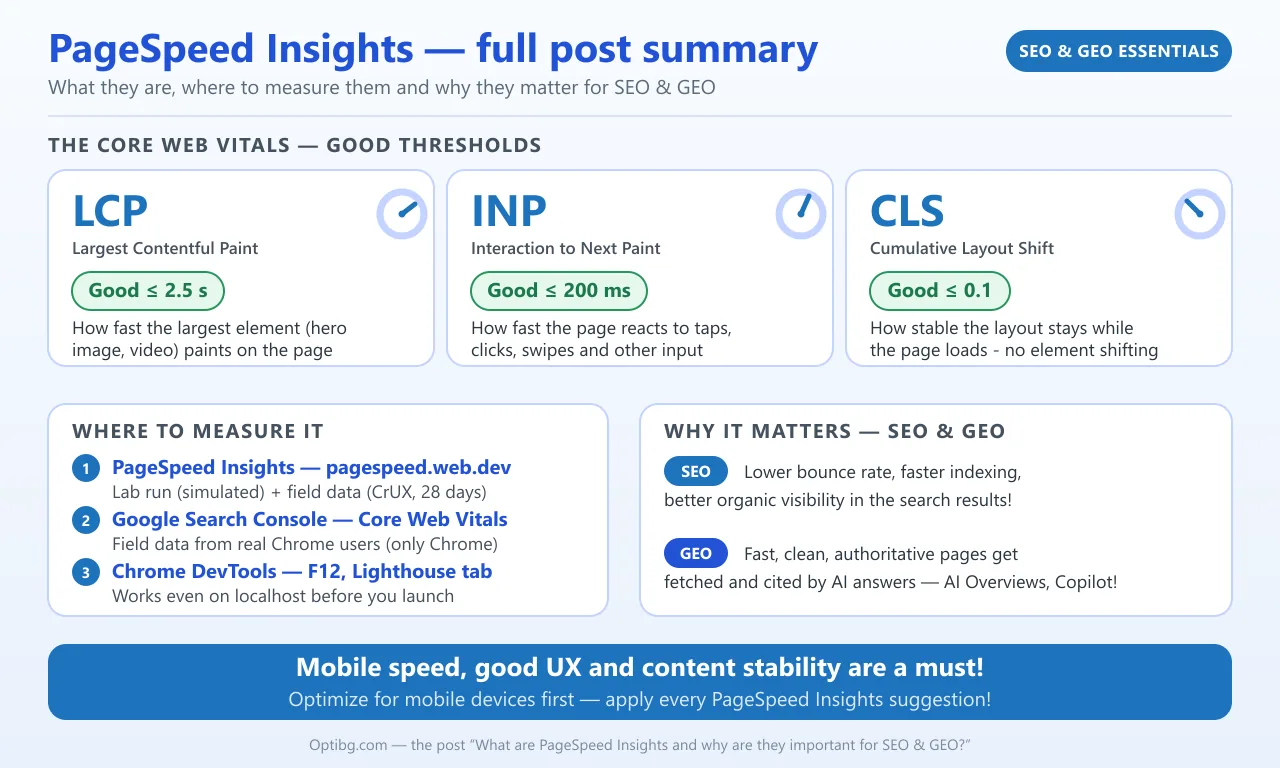
This is an online tool provided by Google that allows you to enter any URL from your website and get important insights into its loading speed on mobile and desktop devices. You can check it out here. It is a lab-based utility that provides realistic data. This means a real-time, simulated page audit run is performed on Google's cloud servers under standardized network and CPU throttling. But that is not all - when your site has enough real visitors, the tool will also show you field data (actual measurements from real users, collected via the Chrome User Experience Report - CrUX)!
The main focus of PageSpeed Insights is on the so-called "Core Web Vitals":
- LCP (Largest Contentful Paint) - this is the loading speed of your website. It measures the time needed to display the largest element on the measured web page. Usually this is the hero or featured image, but not always. Sometimes it could be a video (especially if not embedded but self-hosted), a large infographic or another multimedia file/object. To be a winner in this category you must aim for loading times equal to or less than 2.5 seconds! To achieve this, focus on optimizing the size of the largest element and also try to eliminate render-blocking CSS or JavaScript;
- INP (Interaction to Next Paint) - this is your responsiveness metric. For a webpage to be responsive means to be able to re-shift elements and fit them perfectly on the device it is viewed on, taking into consideration the screen size. But in the context of INP the responsiveness here measures the time needed for interaction with an element. For example: tapping, clicking, swiping, or other user input. To be good here you must aim for responsiveness times of around 200 milliseconds or even less. This can be achieved by optimizing JavaScript tasks by breaking them into smaller chunks that can be processed faster;
- CLS (Cumulative Layout Shift) - this is your visual stability metric. Imagine loading the webpage and the elements start moving, stretching and adjusting time and time again until the final load is there. This is an example of bad CLS! Such "gymnastics" move the readable text away from the visitor's eye and cause irritation and a lack of patience to read — not to mention a potential increase in loading times. A webpage (especially on mobile devices) must load instantly and stably with a target of 0.1 or less. Some of the valuable fixes that you can apply here are to add explicit width and height attributes to images (especially);
PageSpeed Insights are part of your Google Search Console too!
The lab-based results are when you go to the dedicated website for PSI and check a URL on your site. However, in Search Console you can get insights based on field data, gathered by real Chrome users (CrUX collects data only from Chrome - other Chromium-based browsers like Edge do not contribute to it). It is calculated and presented to you on the basis of the last 28 days, thanks to the Chrome User Experience Report (CrUX). And this is probably the best place to mention that you can check how a webpage is doing in terms of Core Web Vitals optimization while building your site locally! How is this possible since there is not even a real, publicly accessible URL address? Easy - modern Chrome and Chrome-based browsers have the so-called Lighthouse tab when you press F12. It will measure even on localhost, based on your machine. You might get lower results than when measuring against PageSpeed Insights online, but this is normal and expected. The important part is that you can be prepared before launching your website by utilizing lab-based data on your own device for mobile and desktop analysis!
Why are PageSpeed Insights metrics important for SEO and GEO, and how?
The main reason for SEO is bounce-rate reduction. Bounce rate is the percentage of visitors who leave your webpage without any further interaction - and slow-loading pages push that percentage up! Higher values of this are an extremely bad SEO signal, and search engines will lower your SERP positioning (the ranking in search results). Another SEO factor that is influenced by the Core Web Vitals is the time for indexing. Better metrics improve indexation speed, and that on its own places your site in the search results. Also, good results for PageSpeed Insights are important for better organic visibility!
As for GEO (Generative AI Engine Optimization) - you will want your website to be authoritative, well-structured, fast-loading and with clean HTML structure. This will allow AI to fetch and cite your content in real time, providing a valuable link to your site and leading traffic and trust to it! Since 2024, an increasing share of search results are AI-generated summaries - think Google AI Overviews and AI Mode, or Copilot answers on Bing!
To wrap it up - mobile speed, good UX and content stability are a must! Most users are browsing using their phones, tablets, watches, in-car panels or other mobile devices! So optimize your content with priority for them, without forgetting desktop optimization too! Read the suggestions that PageSpeed Insights will provide for each Core Web Vital for the analyzed web page and apply them as soon as possible. This will improve your SEO and GEO!
More useful links on the topic:
- Core Web Vitals vs Lighthouse vs PageSpeed: Expert Guide
- PageSpeed Insights vs Lighthouse: What's the difference?
Featured image and the infographic are AI generated.
Related posts



Daniel Angelov
About the author: Senior Automation QA Engineer with over 10 years of experience. A certified SEO and digital marketing specialist with extensive experience in building and optimizing WordPress sites, as well as copywriting. Author and owner of Optibg.com. Interests: Python, Selenium, Playwright, WebdriverIO, Appium, REST API Testing, JavaScript, open-source software, marketing, Photoshop, and more. Enjoys: reading books, computer games, and fishing. For more information, visit the "About the Blog" page and view his portfolio.